Modern ANSI code editor with UTF-8 powers Moderner ANSI-Code-Editor mit UTF-8-Power

NotepadPrime

Version 2.5

Fast code editing. Classic feel. Only 3 MB. Schnelles Coding. Klassisches Gefühl. Nur 3 MB.

NotepadPrime is a native Windows editor built for practical code and text work: A tiny native Windows code editor for PHP, JavaScript, Python, C/C++, Java and scripts. ANSI-friendly editing, UTF-8 save/load, syntax highlighting, line numbers, function navigation, embedded console, smart shortcuts, local snapshots, custom command buttons and an integrated AI icon finder.

NotepadPrime ist ein nativer Windows-Editor für praktische Code- und Textarbeit: Ein kleiner nativer Windows-Code-Editor für PHP, JavaScript, Python, C/C++, Java und Skripte. ANSI-freundliches Editieren, UTF-8 Speichern/Laden, Syntax-Highlighting, Zeilennummern, Funktionsnavigation, eingebettete Konsole, clevere Shortcuts, lokale Snapshots, eigene Command-Buttons und integrierter AI-Icon-Finder.

Freeware · Portable · No installation required · No telemetry · API keys stay local Freeware · Portabel · Keine Installation nötig · Keine Telemetrie · API-Keys bleiben lokal
⬇ Download EXE 2.5 ⬇ EXE 2.5 herunterladen ⬇ Download ZIP 2.5 ⬇ ZIP 2.5 herunterladen
Portable native Windows EXE, current version 2.5.
Recommended: Windows 10 / 11.
Portable native Windows-EXE, aktuelle Version 2.5.
Empfohlen: Windows 10 / 11.
EXE: direct portable download. ZIP: recommended if your browser blocks standalone EXE files. EXE: direkter portabler Download. ZIP: empfohlen, falls der Browser einzelne EXE-Dateien blockiert.
🔒 Encrypted Editing ⚡ Native Windows 🌙 Night Mode 🔢 Line Numbers 🎨 Syntax Highlighting 🔎 Search / Replace 🤖 AI Icon Finder 💾 UTF-8 Save 🧰 Explorer Integration 🤖 GPT Commands 📸 Local Versions 🚀 Command Runner 🧩 Custom Toolbar
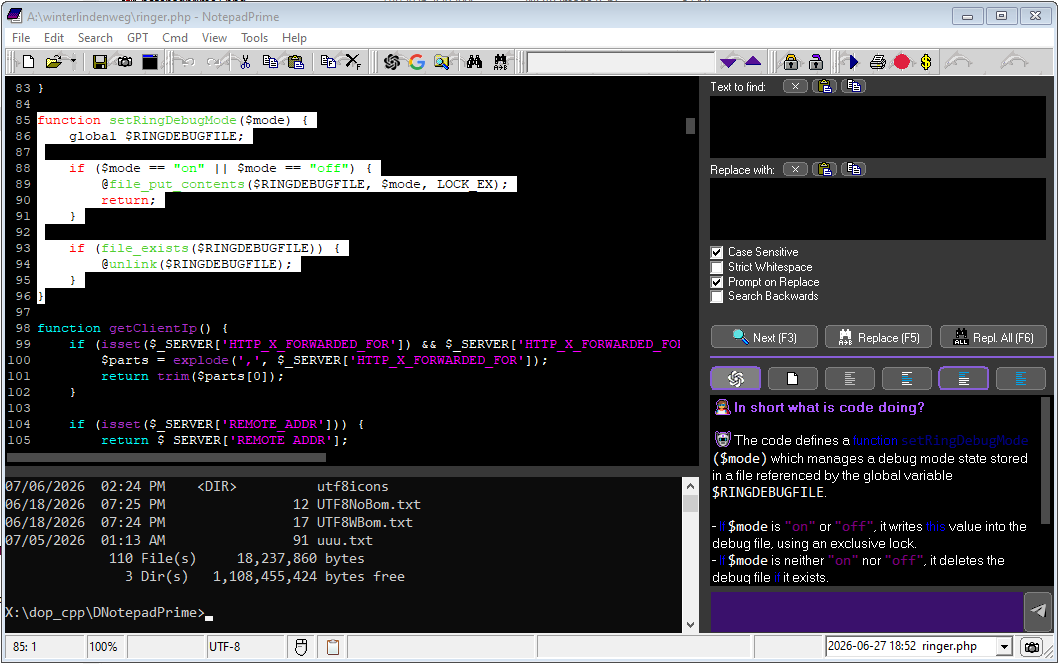
NotepadPrime Screenshot

Classic VCL-style editor experience with modern conveniences: UTF-8 token preview, integrated icon search and a compact native workflow.

Klassisches VCL-Editorgefühl mit modernen Komfortfunktionen: UTF-8 Token-Vorschau, integrierte Icon-Suche und kompakter nativer Workflow.

Free portable Windows code editor Kostenloser portabler Windows Code Editor

NotepadPrime is a free portable Windows code editor for developers who work with PHP, JavaScript, Python, C, C++, Java, batch files and scripts. It combines fast native editing, syntax highlighting, UTF-8-safe saving, function navigation, local snapshots, an embedded console and custom command buttons in a small Windows EXE.

NotepadPrime ist ein kostenloser portabler Windows-Code-Editor für Entwickler, die mit PHP, JavaScript, Python, C, C++, Java, Batch-Dateien und Skripten arbeiten. Er kombiniert schnelles natives Editing, Syntax-Highlighting, UTF-8-sicheres Speichern, Funktionsnavigation, lokale Snapshots, eingebettete Konsole und eigene Command-Buttons in einer kleinen Windows-EXE.

Everything a small, fast code editor should do. Alles, was ein kleiner, schneller Code-Editor können sollte.

NotepadPrime focuses on real daily editing work: open fast, edit cleanly, navigate quickly, save safely. NotepadPrime konzentriert sich auf echte tägliche Editor-Arbeit: schnell öffnen, sauber bearbeiten, zügig navigieren, sicher speichern.

🔒

Encrypted editing Verschlüsseltes Editing

  • Open, edit and save encrypted files directly Verschlüsselte Dateien direkt öffnen, bearbeiten und speichern
  • Encrypt or decrypt selected text from the editor Markierten Text direkt im Editor ver- oder entschlüsseln
  • AES, Blowfish, ChaCha20 and Twofish with password sessions AES, Blowfish, ChaCha20 und Twofish mit Passwort-Sessions
💾

UTF-8 aware savingUTF-8-bewusstes Speichern

  • Token layer for characters outside ANSIToken-Schicht für Zeichen außerhalb von ANSI
  • 🚀 becomes real UTF-8 on save🚀 wird beim Speichern echtes UTF-8
  • Optional BOM handling, with safe behavior for batch filesOptionale BOM-Behandlung, sicher für Batch-Dateien
🎨

Code highlightingCode-Highlighting

  • Keywords, strings, comments and methodsKeywords, Strings, Kommentare und Methoden
  • Delayed colorizing for smoother typingVerzögertes Colorizing für flüssigeres Tippen
  • Night colors and normal colors configurableNight- und Standardfarben konfigurierbar
🔢

Line numbers & bookmarksZeilennummern & Bookmarks

  • Clean gutter with dynamic widthSauberer Gutter mit dynamischer Breite
  • Word wrap toggleWord-Wrap umschaltbar
  • Zoom with toolbar and Ctrl + mouse wheelZoom per Toolbar und Strg + Mausrad
  • Click the gutter to set bookmarks. Jump with Ctrl+B.Klick in die Seitenleiste setzt Bookmarks. Springen mit Strg+B.
⌨️

Smart editing keysSmarte Editor-Tasten

  • Configurable Tab width: spaces or real tabsKonfigurierbare Tab-Breite: Leerzeichen oder echte Tabs
  • Multi-line indent and outdentMehrzeiliges Ein- und Ausrücken
  • Ctrl + / toggles line comments intelligentlyStrg + / schaltet Zeilenkommentare intelligent um
🤖

AI Icon FinderAI-Icon-Finder

  • Open with Ctrl + . inside the editorMit Strg + . direkt im Editor öffnen
  • Search natural words, copy icons instantlyNatürliche Begriffe suchen, Icons sofort kopieren
  • Compact embedded picker window for classic WindowsKompaktes eingebettetes Picker-Fenster für klassisches Windows
🔎

Search & replaceSuchen & Ersetzen

  • Find next / previous with optional case sensitivityVorwärts/rückwärts suchen, optional case-sensitive
  • Replace one, replace all or prompt before replacingEinzeln, alle oder mit Nachfrage ersetzen
  • Progress display for search hitsFortschrittsanzeige für Treffer
🧭

Function navigatorFunktionsnavigator

  • List recognized function namesErkannte Funktionsnamen auflisten
  • Jump to function instantlySofort zur Funktion springen
  • Copy, select or delete a whole function blockGanzen Funktionsblock kopieren, markieren oder löschen
  • Ctrl + Click on a function call jumps to its definition.Strg + Klick auf einen Funktionsaufruf springt zur Definition.
  • Ctrl + Click on brackets jumps to the matching bracket.Strg + Klick auf Klammern springt zur Gegenklammer.
🖱️

Windows integrationWindows-Integration

  • Register common text and code extensionsGängige Text- und Code-Endungen registrieren
  • “Edit with NotepadPrime” context menu„Edit with NotepadPrime“ im Kontextmenü
  • Drag & drop file opening and recent filesDateien per Drag & Drop öffnen und Recent Files
🖥️

Embedded consoleEingebettete Konsole

  • Optional command panel inside the editorOptionales CMD-Panel direkt im Editor
  • Working directory can be set or derived from the current fileArbeitsverzeichnis festlegbar oder automatisch aus aktueller Datei
  • Commands can run in the internal panel or an external console windowCommands laufen wahlweise intern oder in externem Konsolenfenster
🤖

GPT command workflowGPT-Command-Workflow

  • Auto context: selection, current function or all codeAuto-Kontext: Selection, aktuelle Funktion oder gesamter Code
  • Output actions: replace, insert before/after, new file, clipboard or conversationAusgabe: ersetzen, davor/danach einfügen, neue Datei, Clipboard oder Conversation
  • Inserted GPT results stay selected for direct command chainingEingefügte GPT-Ergebnisse bleiben zum Weiterverketten selektiert
📸

Local snapshotsLokale Snapshots

  • Simple version files next to your working file, no Git requiredEinfache Versionsdateien neben der Arbeitsdatei, kein Git nötig
  • Optional version titles and readable snapshot namesOptionale Versionstitel und lesbare Snapshot-Namen
  • Restore old snapshots safely back into the main fileAlte Snapshots sicher in die Hauptdatei zurückholen
🚀

Command runnerCommand Runner

  • Custom build, deploy, make, npm, PHP or batch commandsEigene Build-, Deploy-, make-, npm-, PHP- oder Batch-Commands
  • Optional shortcuts and automatic menu entriesOptionale Shortcuts und automatische Menüeinträge
  • Useful placeholders such as file, directory and basenamePraktische Platzhalter wie Datei, Ordner und Basisname
🧩

Custom toolbar buttonsEigene Toolbar-Buttons

  • Visual shortcuts for existing menu actions, GPT commands or terminal commandsVisuelle Shortcuts für Menüaktionen, GPT-Commands oder Terminal-Commands
  • Choose built-in icons or browse for a custom 16×16 bitmapStandardicons wählen oder eigenes 16×16-Bitmap verwenden
  • The command exists once, toolbar buttons only trigger itDer Command existiert einmal, Toolbar-Buttons lösen ihn nur aus
⚙️

Deep settingsTiefe Einstellungen

  • Day/night editor colors for text, keywords, strings, comments, methods and tokensDay-/Night-Farben für Text, Keywords, Strings, Kommentare, Methoden und Tokens
  • Panel font sizes, tab width, code completion and virtual spacesPanel-Schriftgrößen, Tab-Breite, Code Completion und Virtual Spaces
  • GPT timeout, model, API URL, usage tokens and rough cost trackingGPT-Timeout, Modell, API-URL, Tokenverbrauch und grobe Kostenschätzung

Power shortcuts Power-Shortcuts

Ctrl + Click function Jump to the function definitionZur Funktionsdefinition springen
Ctrl + Click bracket Jump to the matching bracketZur passenden Gegenklammer springen
Ctrl + B Jump to the next bookmarkZum nächsten Bookmark springen
Ctrl + Shift + B Toggle bookmark on the current lineBookmark in aktueller Zeile setzen/löschen
Ctrl + / Toggle // line comments//-Zeilenkommentare umschalten
Ctrl + # Toggle # line comments#-Zeilenkommentare umschalten
Ctrl + . Open the AI icon finderAI-Icon-Finder öffnen
Ctrl + Mouse Wheel Zoom in and outRein- und rauszoomen

A practical UTF-8 workflow for classic ANSI editing. Ein praktischer UTF-8-Workflow für klassisches ANSI-Editing.

The editor stays compatible with the old VCL/RichEdit world while still letting you use modern Unicode characters safely. Der Editor bleibt kompatibel mit der alten VCL/RichEdit-Welt und erlaubt trotzdem moderne Unicode-Zeichen.

01
Paste UnicodeUnicode einfügen Paste emoji or non-ANSI text from the clipboard. Emoji oder Nicht-ANSI-Text aus der Zwischenablage einfügen.
02
Edit as tokensAls Token bearbeiten Characters are represented as readable [[U+...]] tokens. Zeichen werden als lesbare [[U+...]]-Tokens dargestellt.
03
Preview on hoverVorschau per Hover Hold Ctrl over a token to preview the real icon. Strg über einem Token halten, um das echte Icon zu sehen.
04
Save as UTF-8Als UTF-8 speichern On save, tokens are converted back to real Unicode text. Beim Speichern werden Tokens wieder zu echtem Unicode.
AreaBereich
Classic Notepad styleKlassischer Notepad-Stil
NotepadPrime
UTF-8
Can be fragile in ANSI-era componentsKann in ANSI-Komponenten fragil sein
Token-safe edit model, UTF-8 outputToken-sicheres Edit-Modell, UTF-8-Ausgabe
CodingCoding
Plain text onlyNur Plain Text
Syntax highlighting, comments, tabs, function listSyntax-Highlighting, Kommentare, Tabs, Funktionsliste
WorkflowWorkflow
Separate tools neededSeparate Tools nötig
Explorer integration, recent files, embedded terminal, command runner and local snapshotsExplorer-Integration, Recent Files, eingebettete Konsole, Command Runner und lokale Snapshots
IconsIcons
Manual copy/searchManuell suchen/kopieren
Integrated AI icon finder with instant clipboard copyIntegrierter AI-Icon-Finder mit direktem Clipboard-Copy
GPT
Usually external chat copy/pasteMeist externer Chat mit Copy/Paste
Context-aware custom commands with selectable result targetsKontextbewusste Custom Commands mit auswählbarem Ergebnisziel

Ready for a tiny editor with serious tricks? Bereit für einen kleinen Editor mit großen Tricks?

Download the portable EXE, open a code file and press Ctrl + . to try the icon finder. Portable EXE herunterladen, Code-Datei öffnen und mit Strg + . den Icon-Finder testen.

⬇ Download 2.5 ⬇ Download 2.5

About / press information Kurzinfo / Presse

Short facts for download archives, blogs and editors. Kurzangaben für Download-Archive, Blogs und Redaktionen.

NotepadPrime is a free portable native Windows code editor developed in Germany. It focuses on fast local editing, UTF-8-safe saving, syntax highlighting, function navigation, local snapshots, an embedded console and optional BYOK GPT commands.

NotepadPrime ist ein kostenloser portabler nativer Windows-Code-Editor aus Deutschland. Der Fokus liegt auf schnellem lokalem Editing, UTF-8-sicherem Speichern, Syntax-Highlighting, Funktionsnavigation, lokalen Snapshots, eingebetteter Konsole und optionalen BYOK-GPT-Commands.

  • Version: 2.5
  • License: Freeware / non-commercial public-domain style release
  • Platform: Windows 10 / 11
  • Package: portable EXE / ZIP
  • Telemetry: none
  • Website: notepadprime.com

NotepadPrime is an independent native Windows editor project developed since 2025, focused on fast local code and text editing for Windows.